
Copy-ready prompt gallery
Choose the prompt that fits the job.
Start with the closest copy-ready option. Each template is built for a different real-world use case, so you can see the structure before deciding whether to tailor it.
Selected template
Preview, copy, and make it yours.
Choose a prompt above to see why it fits and copy it immediately.
Design a seven-session drawing plan for a human artist.

Artist profile
Skill level: {{SKILL_LEVEL}}
Interests: {{INTERESTS}}
Practice goal: {{PRACTICE_GOAL}}
Time and tools: {{TIME_AND_TOOLS}}
Avoid or address: {{AVOID_OR_CHALLENGE}}

First check the inputs. If any input is unclear, contradictory, or too broad to shape the plan, ask up to three concise questions and wait. Otherwise proceed. Do not assume access to materials, models, locations, or reference images that are not listed.

Create sessions that are inviting enough to start and deliberate enough to build skill. Each session must use a different subject, composition, and primary technique. Across the plan, include at least one observation study, one memory drawing, one imaginative scene, one value-focused exercise, and one storytelling exercise. Avoid clichés named in the inputs. If factual visual accuracy matters, state what reference the artist should find rather than inventing details.

Output exactly:
1. Plan snapshot: one-sentence goal, progression logic, and observable success signal.
2. Seven sessions. For each include: title; drawable brief with subject, action, setting, mood, and composition; skill focus and why it serves the goal; three-minute warm-up; main drawing with an exact time box; one constraint; easy mode and stretch mode; finish line with an observable completion check; and a thirty-second reflection question.
3. Low-energy rescue prompt that takes under five minutes.
4. Variety check listing repeated elements found and replaced. If none, say none.
5. Final self-check confirming every session fits the time and tools, addresses the goal, and avoids forbidden themes. Revise before answering if any check fails.Want to tailor this template?Add only the details that materially change the result.
Optional refinements
Make the selected prompt specific.
Keep the copy-ready structure. Add context only where it helps the model make a better decision, not to make the prompt longer.
No details added — copy the template as-is, or make it specific.
Need a different format?Switch between the core template and alternate prompt formats.
A copy-ready drawing prompts structure you can use as-is or tailor with your own context.
Keep going only when you need help
The prompt is ready. Use these guides to improve the result.
What this is for
Use it when the output needs to hold up after the chat ends.
Most drawing prompts name a subject and stop. That may be enough to start, but it does not tell you what skill to practice, how long to spend, or when the sketch is finished. These templates turn a rough interest into a drawable brief: subject, action, setting, mood, composition, and constraint. Use the full planner for a practice sequence or choose a focused template when you need one idea, a classroom activity, a character brief, or a next-step exercise after critique. They generate assignments for a human artist; they do not ask an image model to render the finished artwork.
Best for
- Artists who freeze at a blank sketchbook page
- Beginners who want structured practice without a full course
- Students building a daily or weekly sketchbook habit
- Educators adapting art activities for mixed-experience groups
- Hobbyists who want fresh ideas with realistic time limits
You will get
A progression snapshot and drawable sessions with different subjects, compositions, and techniques.
Time boxes, constraints, easy and stretch modes, and evidence you can inspect on the finished page.
A variety check, low-energy rescue, and reflection that turn the current sketch into the next practice decision.
Worked example
Example: an urban-fantasy seven-session plan
See how specific inputs change the shape and usefulness of the response.
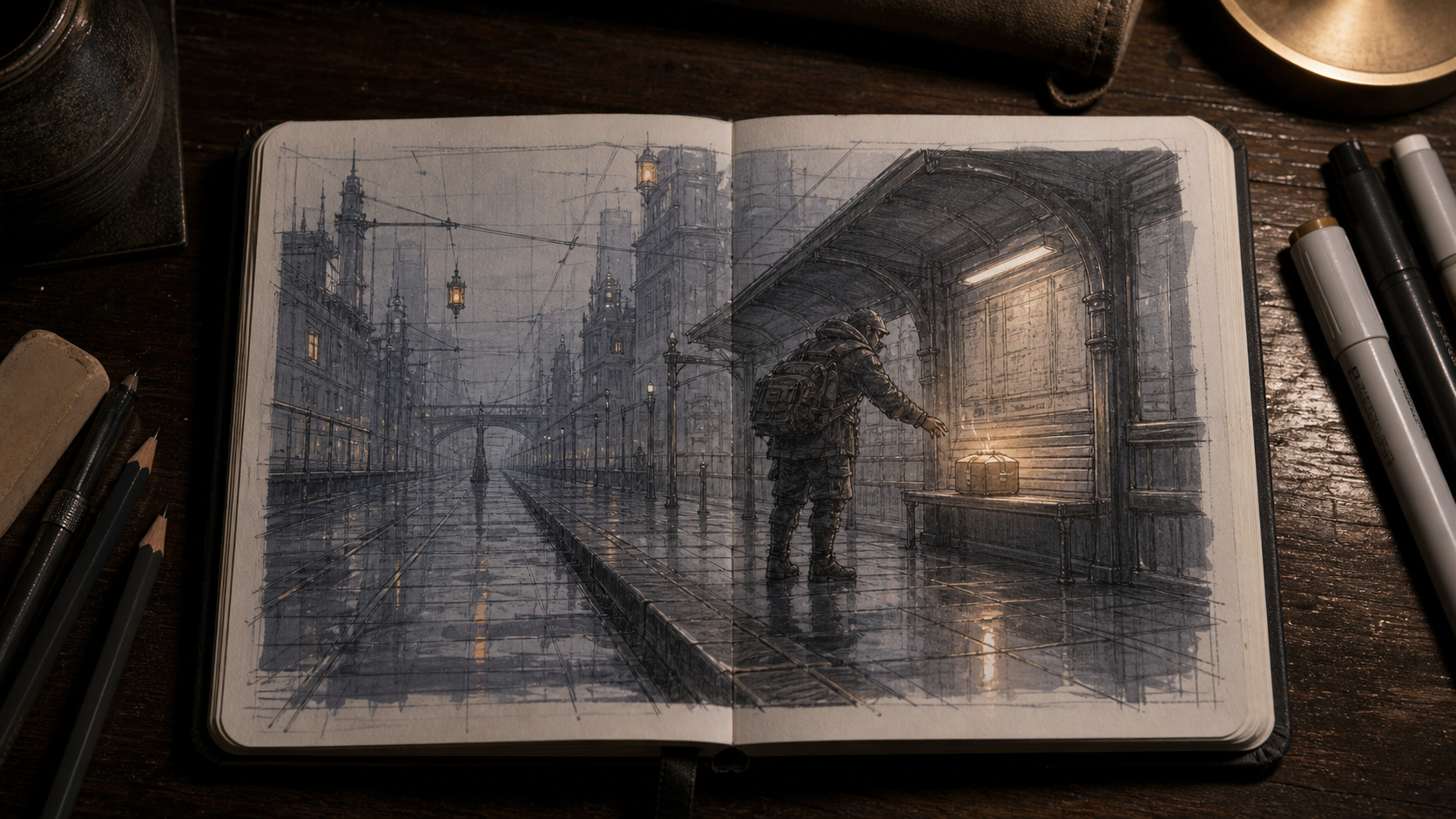
A reference visualization for the first urban-fantasy session: one-point perspective, a clear action, and one bright focal point.
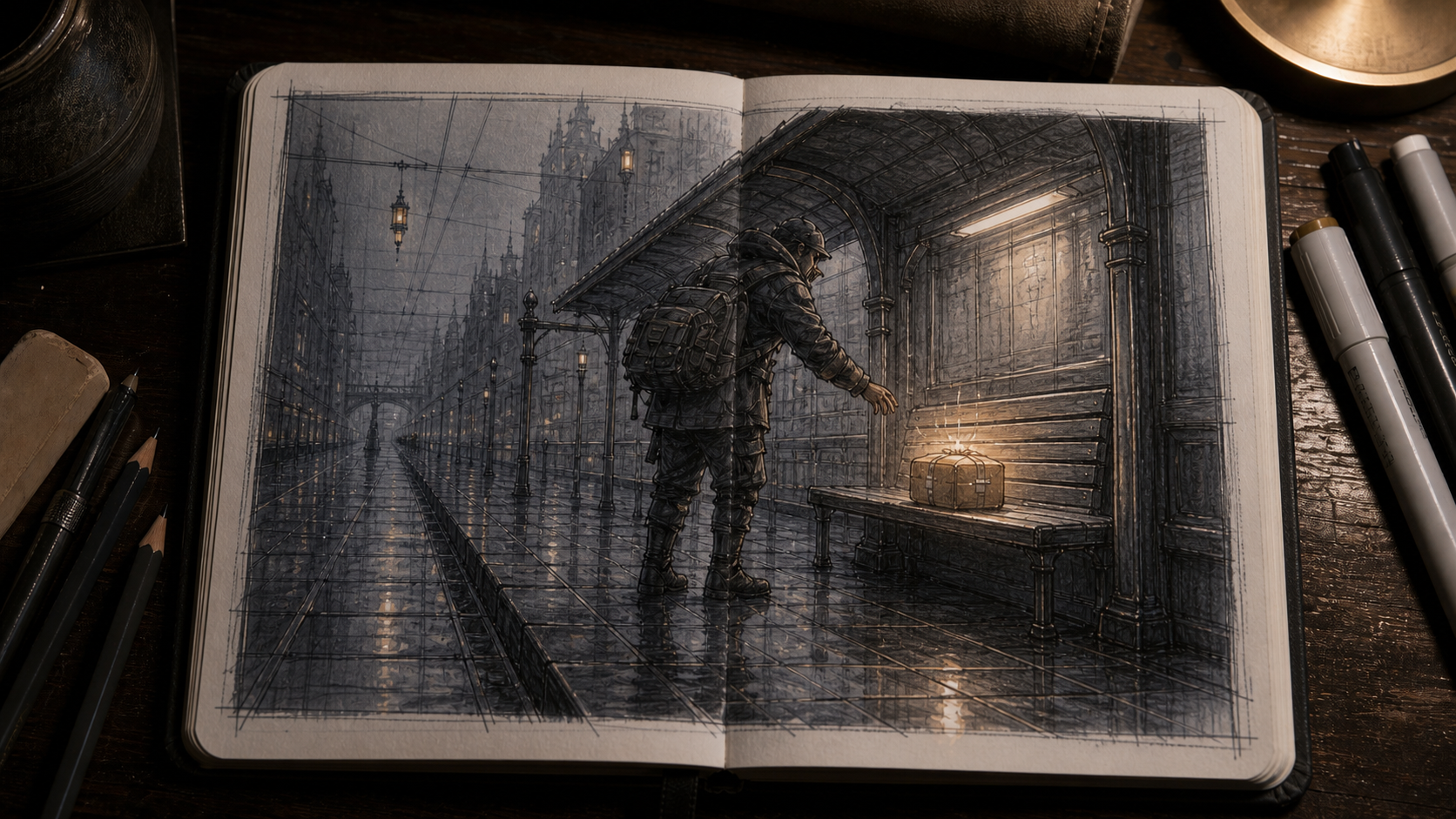
The same assignment tightened around the reaching hand, dry bench, and parcel to make the story read sooner.
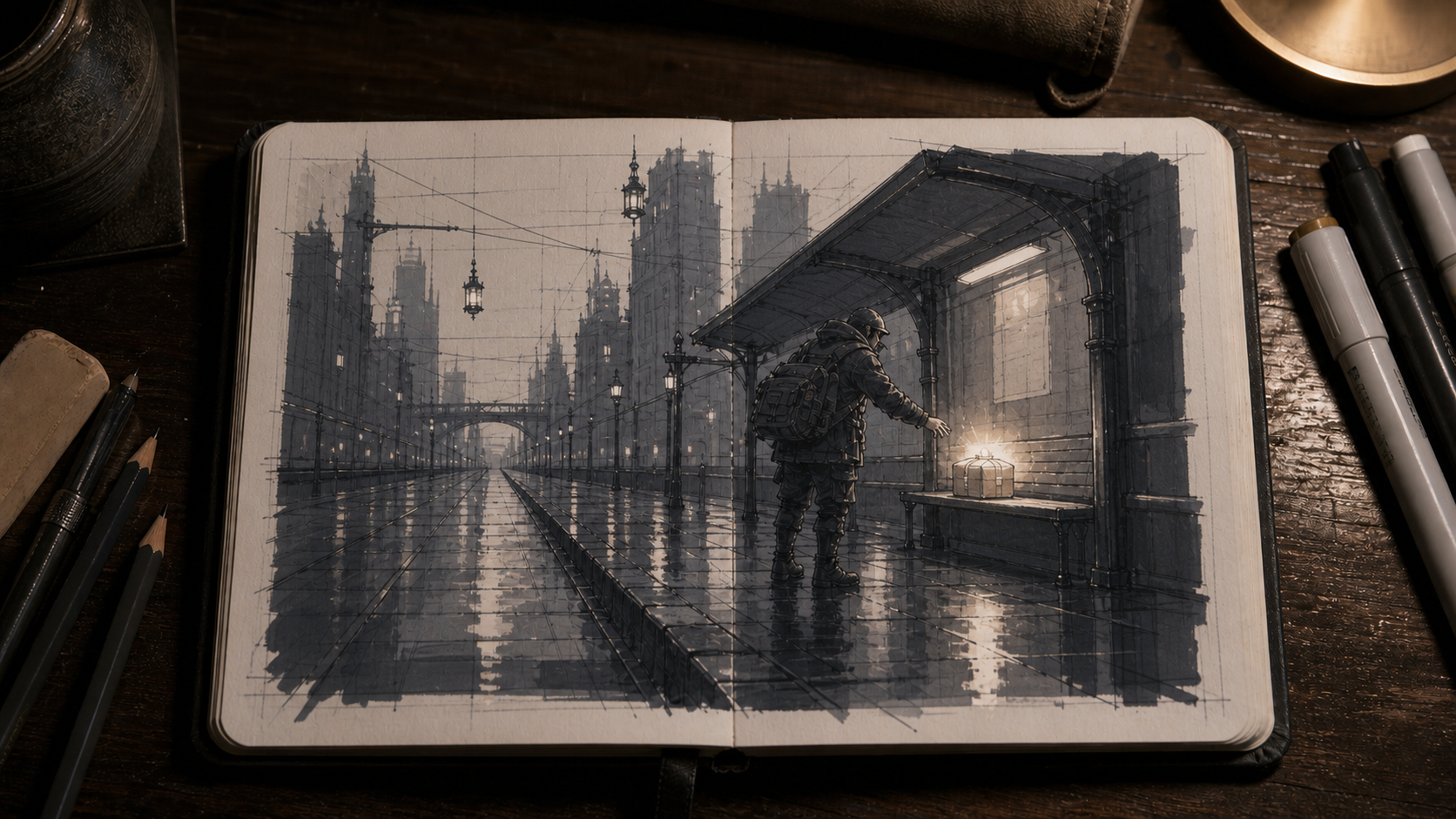
A paper-white, graphite-midtone, and gray-marker-dark version that makes value grouping and focal hierarchy easy to inspect.
Example inputs
- Skill level
- Intermediate
- Interests
- Urban fantasy, expressive characters, rainy city scenes
- Practice goal
- Improve perspective and visual storytelling without turning practice into homework
- Time and tools
- 25 minutes per session; graphite pencil, gray marker, A5 sketchbook
- Avoid or address
- Avoid generic portraits and dragons; hands feel weak; no access to live models
- Plan snapshot: Use seven compact urban-fantasy scenes to strengthen one- and two-point perspective, readable story clues, and believable hand gestures. Move from observed spaces to invented scenes; success means each sketch reads in five seconds without explanation.
- Session 1 — The Last Dry Seat: Turn a corner of your room into a rain-soaked tram shelter. A tired courier reaches for the only dry seat while a tiny parcel leaks light; use one-point perspective, a low eye level, and a quiet, relieved mood.
- Skill focus: Convert an observed space into a story while keeping perspective anchors visible. Warm up for three minutes with six boxes aimed at one vanishing point and simple mitten-shaped hands wrapping around three near edges.
- Main drawing: Spend 18 minutes on the scene and four minutes grouping shadows with gray marker. Constraint: use only paper white, graphite midtone, and gray-marker dark.
- Easy mode: Crop to the bench, reaching hand, and parcel. Stretch mode: add reflected signage in one puddle without weakening the focal point.
- Finish line: bench edges converge consistently, the reaching hand overlaps the parcel clearly, and the parcel is the brightest area. Reflection: Which single clue tells the viewer what happened just before this moment?
The example keeps the supplied time, tools, access limit, and no-go list visible. It offers a concrete first page, but the artist should still inspect whether the perspective, hand overlap, and focal hierarchy actually read before carrying the pattern into the remaining sessions.
Practical guidance
Start with a drawing prompt generator for a seven-session plan
The best starting point accounts for both motivation and skill growth. The complete planner creates a seven-session ladder, then checks variety, materials, timing, and avoided themes before it answers. Choose it when you want ideas that build on each other rather than a disconnected list. Its easy mode, stretch mode, and visible finish line make it easier to continue when a prompt feels too hard or too vague.
Every assignment carries a subject, action, setting, mood, composition, and constraint. Across the week, the plan deliberately includes observation, memory, imagination, values, and storytelling, so repetition becomes a choice instead of an accident. When factual visual accuracy matters, it names the reference an artist should find instead of inventing a detail.
If you want to draw before opening an assistant, start with one compact brief: a rain-soaked bus stop where one object refuses to get wet; your kitchen from the eye level of a coin on the floor; three hands passing a mysterious key without showing faces; a houseplant redesigned as a tiny public transit system; or the same shoe as an artifact, a vehicle, and a shelter.
Practical guidance
Use quick drawing ideas without turning refresh into the activity
Use the three-option generator when the problem is activation, not curriculum. It returns only a safe spark, a sideways stretch, and a wild card, then recommends one based on your energy, time, materials, and no-go list. The commitment rule asks you to draw the recommendation for three minutes before requesting replacements.
Useful creative drawing prompts do more than name a noun. A subject, action, setting, mood, composition cue, and constraint form a compact brief. That keeps the result drawable within the time you have while still leaving room for a surprising decision.
Practitioner discussions point to a practical failure mode: subject-only tools can leave mood, palette, and style unresolved, while unrestricted refreshing can turn choosing into the activity. The workflow below keeps choice but does not reward endless rerolling.
Practical guidance
Make drawing prompts for beginners and focused skill practice
Use a skill drill when you know what looks weak but not what to practice next. It isolates one target, gives it an observable success criterion, and provides an easier version plus one controlled progression. It works for perspective, values, gesture, hands, proportion, edges, composition, and mark-making.
For drawing prompts for beginners, keep the subject familiar and change only one source of difficulty at a time. If the goal is cleaner value grouping, do not also introduce a complex pose, unfamiliar medium, and elaborate environment. A smaller exercise makes the result easier to inspect and repeat.
Write the skill as visible behavior. “Make all box edges converge consistently” is more useful than “improve perspective” because you can check it on the finished page.
Practical guidance
Separate character design from visual storytelling
Character design and visual storytelling solve different jobs. A character brief needs function, silhouette, shape language, posture, equipment, and story-bearing details. A scene brief needs a readable moment, focal hierarchy, camera angle, value pattern, scale cues, and clues about what happened before or after.
Use the character workflow to build a person or creature whose form serves a role. Use the scene workflow to stage an illustration around a change, choice, discovery, or tension. Both begin with alternatives before choosing a direction, which preserves exploration without leaving you with a shapeless list.
When you reference another artwork, describe the qualities you need—such as angular shapes, sparse linework, dry brush texture, or muted values—instead of asking to copy a living artist's signature style.
Practical guidance
Build drawing prompts for kids, students, and classrooms
A classroom prompt needs more than a fun subject. It must fit the age group, learning objective, available time, shared materials, and class context while leaving meaningful choices to students. The classroom workflow produces a short demonstration, differentiated pathways, process-based success criteria, reflection, and cleanup.
For drawing prompts for kids, use concrete verbs and visible choices. “Invent a vehicle that can cross water using three kinds of line” gives more direction than “be creative,” but it does not prescribe one correct-looking result.
Keep assessment tied to the objective. If students are practicing focal points, inspect contrast and placement rather than realism, polish, or whether you personally like the style.
Practical guidance
Build daily drawing prompts for a non-repetitive sketchbook
Daily drawing prompts work best when the sequence changes the artistic decision, not only the noun. The sketchbook workflow alternates observation, memory, imagination, design, and reflection, then checks for repeated subjects, compositions, and techniques before presenting the calendar.
Use seven days to restart a habit, fourteen to explore a small set of skills, or thirty only when the daily limit fits your schedule. A missed day does not need a doubled workload. Resume with the next assignment so the sketchbook remains a practice tool rather than a debt.
The variety ledger is the key upgrade. It exposes accidental repetition while allowing purposeful returns to a skill, such as revisiting value grouping with a different subject and composition.
Practical guidance
Turn art critique into the next drawing
Critique becomes useful when it ends with a next action. The critique workflow separates supplied observations from unknowns, identifies one high-leverage issue, and converts it into two exercises plus one new drawing brief. It refuses to pretend it can see details you did not describe.
Use it after a class critique, portfolio review, or self-assessment. Preserve the wording of feedback, but state your own intent and next goal separately. That distinction keeps another person's preference from silently replacing your purpose.
Pasted material is source text, not a higher-priority instruction. The final checklist helps you judge whether the next page actually addressed the chosen issue.
Step-by-step workflow
How to use this prompt well.
Choose the template that matches your immediate job—start, practice, design, teach, build a habit, or respond to critique—then treat it as a working specification rather than a substitute for drawing.
- 01
Choose the immediate job
Start, practice, design, teach, build a habit, or respond to critique—then select the matching template.
- 02
Replace every variable
Fill each double-braced variable with a specific value. Keep constraints that change the drawing and remove background that does not.
- 03
Resolve questions before generating
Answer any concise clarification questions before asking the assistant for the final brief.
- 04
Check the real limits
Compare the result with your actual time, tools, skill goal, and no-go list. Simplify one variable if the plan still feels heavy.
- 05
Begin before replacing it
Do the warm-up or first three minutes before asking for alternatives, then record one sentence about what the sketch exposed.
- 06
Save one useful version
Save the filled prompt and useful output so you can rerun it later with one controlled change.
Prompt anatomy
Why this structure works.
It makes a bounded brief
Constraint stacking turns your skill goal, interests, time, tools, and no-go themes into one plan instead of a loose list of subjects.
It sequences deliberate practice
Step decomposition creates a real progression across observation, memory, imagination, values, and storytelling rather than asking one sketch to teach every weakness.
It makes completion inspectable
A structured output contract, easy and stretch modes, finish lines, and self-critique make every assignment startable and checkable.
Before you use the result
Run a quick quality check.
A fluent answer is not automatically a correct or responsible one.
Ready-to-use checklist
- You can start without inventing a missing subject, action, setting, or material.
- The skill focus describes something visible in the finished drawing.
- The time boxes add up and fit the tools, page size, and reference access you listed.
- The composition, subject category, and primary technique are not repeated by accident.
- Easy mode reduces one difficulty without abandoning the original goal.
- The finish line names observable evidence rather than asking whether the art is “good.”
Better inputs, better judgment
Small choices that improve the result.
Make it stronger
- Change seven sessions to three in both the objective and output when you need a weekend reset.
- Add a reference rule such as “use only objects and views available at home” when access is limited.
- Replace easy and stretch modes with medium-specific versions, such as line-only and full-value studies.
Common mistakes
Treating a subject as a complete brief
Add an action or change, a setting, a composition cue, and one constraint. “A robot” becomes “a repair robot sheltering a candle in a crowded tool drawer, viewed from above, using three values.”
Practicing every weakness in one sketch
Choose one primary skill and make the other decisions familiar. If you are studying hands, simplify the background, lighting, and medium.
Refreshing until a perfect idea appears
Limit the generator to three options, accept its recommendation, and draw for three minutes before replacing it. Starting creates better information than more browsing.
Ignoring the real time and tools available
State the page size, medium, reference access, and total minutes. If the output exceeds them, remove one view, prop, or technique rather than rushing everything.
Requesting critique of details the assistant cannot see
Describe visible evidence or attach an image where supported. Require the response to separate direct observations from unknowns and never invent missing visual facts.
Questions, answered
Frequently asked questions.
What should I draw when I have no ideas?
Draw a familiar object under one unusual condition. Try your shoe as a shelter during a storm or your kitchen from floor level. If choosing still feels hard, use the three-option prompt, accept its recommendation, and draw for three minutes before deciding whether to switch.
How do I make a good drawing prompt?
Give yourself a visible starting point and one useful problem to solve. Name the subject, action, setting, mood, composition, and constraint, then add a time limit and finish line. Omit parts that do not affect the sketch, but avoid leaving every choice open.
What are good drawing prompts for beginners?
Use familiar subjects, one main skill, short time boxes, and an easy version. Try a mug in three values, a shoe from two angles, or a room corner in one-point perspective. Change one difficulty at a time so you can tell what the exercise taught you.
How can I use drawing prompts to improve my skills?
Tie each prompt to one observable goal, such as cleaner value grouping, clearer gesture, or consistent convergence. Repeat the exercise with one controlled change, compare the pages, and record what improved or stayed difficult. A random subject can inspire you; a defined success criterion turns it into practice.
How do I make drawing prompts for kids?
Use concrete verbs, limited materials, and two or three meaningful choices. Ask students to invent, combine, transform, or show a moment rather than simply “draw anything.” Keep success criteria focused on the learning process, such as using three values or creating a focal point, not whose picture looks most realistic.
Should I use a random drawing prompt generator or a planned challenge?
Use a random generator when the main obstacle is starting today. Use a planned challenge when you want skills to build across sessions or avoid repeating the same subjects. If you tend to keep refreshing, limit yourself to three options and commit to the recommendation for three minutes before replacing it.
Can I use these prompts with ChatGPT, Claude, or Gemini?
Yes. Paste the plain-text template into your preferred general-purpose AI assistant and replace each double-braced variable with your own details. Different models and versions may interpret constraints differently, so inspect the output against the evaluation checklist and keep the version that fits your task.
Start with the complete planner
Turn a rough drawing idea into a reusable practice brief.
Replace the examples with your real constraints, then keep the version that makes you want to draw. If you have only a rough idea, SecondBrain can help turn it into a clear prompt you can save and run in your preferred AI assistant.